|
[This writeup is a copy (hopefully faithful) of material from Section 3.4 of W.R. Stevens' book UNIX Network Programming, First Edition - ISBN 0-13-949876. Some minor revisions were made to suit C++ instead of C.]
Pipes are provided with all flavors of Unix. A pipe provides a
one-way flow of data. A pipe is created by the pipe system
call.
int pipe(int *filedes);
Two file descriptors are returned - filedes[0] which is open for reading, and filedes[1] which is open for writing. Pipes are of little use within a single process, but here is a simple example that shows how they are created and used.
#include <iostream>
#include <stdio.h>
#include <stdlib.h>
#include <unistd.h>

using namespace std;

main()
{
   int   pipefd[2], n;
   char  buff[100];

   if (pipe(pipefd) < 0)
      perror("pipe errer");

   cout << "read fd = " << pipefd[0] << ", write fd = " << pipefd[1] << endl;
   if (write(pipefd[1], "hello world\n", 12) != 12)
      perror("write error");

   if ( (n = read(pipefd[0], buff, sizeof(buff))) <= 0)
      perror("read error");

   write(1, buff, n);   /* fd  1 == stdout */

   exit(0);
}
The output of this program isread fd = 3, write = 4 hello world
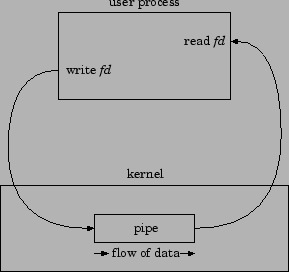
A diagram of what a pipe looks like in a single process is shown in the following Figure 1. A pipe has a finite size, always at least 4096 bytes. The rules for reading and writing a pipe - when there is either no data in the pipe, or when the pipe is full - are provided in the next section on FIFO's.
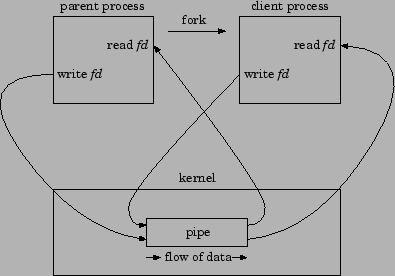
Pipes are typically used to communicate between two different
processes in the following way. First, a process creates a pipe and
then forks to create a copy of itself, as shown in Figure 2.
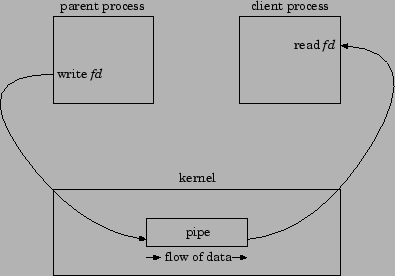
Next the parent process closes the read end of the pipe and the child
process closes the write end of the pipe. This provides a one-way
flow of data between the two processes as shown in Figure 3.
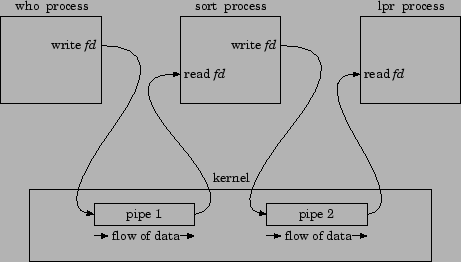
When a user enteres a command such as
who | sort | lprto a Unix shell, the shell does the steps shown below to create three processes with two pipes between them. (who is a program that outputs the login names, terminal names, and login times of all users on the system. the sort program orders this list by login names, and lpr is a 4.3BSD program that sends the result to the line printer.) We show this pipeline in Figure 4.
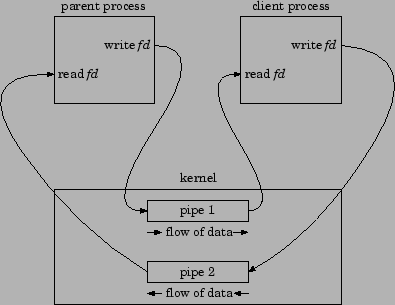
Note that all the pipes shown so far have all been unidirectional,
providing a one-way flow of data only. When a two-way flow is
desired, we must create two pipes and use one for each direction. The
actual steps are
Let's now implement the client-server example described in the
previous section using pipes. The main function creates the
pipe and forks. The client then runs in the parent process
and the server runs in the child process.
#include <iostream>
#include <stdio.h>
#include <stdlib.h>
#include <unistd.h>
#include <sys/types.h>
#include <sys/stat.h>
#include <fcntl.h>
#include <wait.h>
#include <strings.h>

using namespace std;

#define MAXBUFF 1024

int main()
{
  void client (int, int);
  void server (int, int);
  int childpid, pipe1[2], pipe2[2];

  if (pipe(pipe1) < 0 || pipe(pipe2) < 0)
    perror("can't create pipes");

  if ( (childpid = fork()) < 0) {
    perror("can't fork");
  }
  else if (childpid > 0) {              /* parent */
    close(pipe1[0]);
    close(pipe2[1]);

    client(pipe2[0], pipe1[1]);

    while (wait(NULL) != childpid)
      ;  /* wait for child */

    close(pipe1[1]);
    close(pipe2[0]);
    exit(0);
  } else {
    close(pipe1[1]);
    close(pipe2[0]);

    server(pipe1[0], pipe2[1]);

    close(pipe1[0]);
    close(pipe2[1]);
    exit(0);
  }

  return 0;
}
The client function is
void client (int readfd, int writefd)
{
   char buff[MAXBUFF];
   int  n;

   /*
    * Read the filename from standard input,
    * write it to the IPC descriptor
    */

   if (fgets(buff, MAXBUFF, stdin) == NULL)
      perror("client: filename read error");

   n = strlen(buff);
   if (buff[n-1] == '\n')
      n--;               /* ignore newline from fgets() */
   if (write(writefd, buff, n) != n)
      perror("client: filename write error");

   /*
    * Read the data from the IPC descriptor and
    * write to standard output
    */

   while ( (n = read(readfd, buff, MAXBUFF)) > 0)
      if (write(1, buff, n) != n)   /* fd 1 = stdout */
         perror("client: data write error");

   if (n < 0)
      perror("client: data read error");
}
The server function is
void server (int readfd, int writefd)
{
   char buff[MAXBUFF];
   char errmesg[256];
   int  n, fd;

   /*
    * Read the filename from the IPC descriptor
    */

   if ( (n = read(readfd, buff, MAXBUFF)) <= 0)
      perror("server: data read error");
   buff[n] = '\0';    /* null terminate filename */

   if ( (fd = open(buff, 0)) < 0) {
      /*
       * Error.  Format an error message and send it back
       * to client
       */

     strcpy(errmesg, ": can't open ");
     strcat(errmesg, buff);  /* attach file name to msg */
     n = strlen(buff);
     if (write(writefd, buff, n) != n)
       perror("server: errmesg write error");
   } else {
      /*
       * Read the data from the file and write to
       * the IPC descriptor
       */

      while ( (n = read(fd, buff, MAXBUFF)) > 0)
      if (write(writefd, buff, n) != n)
         perror("server: data write error");

      if (n < 0)
         perror("server: read error");
   }
}
The standard IO library provides a function that creates a pipe and
initiates another process that either reads from the pipe or writes to
the pipe.#include <stdio.h> FILE *popen(char *command, char *type);command is a shell command line. It is invoded by the Bourne shell, so the PATH environment variable is used to locate the command. A pipe is created between the call-ing process and the specified command. The value returned by the popen is a standard IO FILE pointer that is used for either input or output, depending on the character string type. If the value of type is r the calling process writes to the standard output of the command. If the popen call fails, a value of NULL is returned. The function
#include <stdio.h>

int pclose(FILE *stream);
closes an IO stream that was created by popen, returning the exit status of the command, or -1 if the stream was not created by popen.
We can provide another solution to our client-server example using the popen function and the Unix cat program.
#include <stdio.h>
#include <strings.h>
#include <unistd.h>
#include <stdlib.h>

#define MAXLINE 1024

main()
{
   int  n;
   char line[MAXLINE], command[MAXLINE + 10];
   FILE *fp;

   /*
    * Read the filename from standard input
    */

   if (fgets(line, MAXLINE, stdin) == NULL)
      perror("filename read error");

   /*
    * Use popen to create a pipe and execute the command
    */

   strcpy(command, "cat ");
   strcat(command, line);
   if ((fp = popen(command, "r")) == NULL)
      perror("popen error");

   /*
    * Read the data from the FILE pointer and write
    * to standard output
    */

   while ((fgets(line, MAXLINE, fp)) != NULL) {
      n = strlen(line);
      if (write(1, line, n) != n)
         perror("data write error");
   }

   if (ferror(fp))
      perror("fgets error");

   pclose(fp);
   exit(0);
}
Another use of popen is to determine the current working directory of a process. Recall that the chdir system call changes the current working directory for a process, but there is not an equivalent system call to obtain its current value. System V provides a getcwd function to do this. 4.3BSD provides a similar, but not identical, function getwd.
The following program obtains the current working directory and prints it, using the Unix pwd command.
#include <iostream>
#include <stdio.h>

using namespace std;

#define MAXLINE 255

main()
{
   FILE *fp;
   char line[MAXLINE];

   if ( (fp = popen("/bin/pwd", "r")) == NULL)
      perror("popen error");

   if (fgets(line, MAXLINE, fp) == NULL)
      perror("fgets error");

   cout << line;    /* pwd inserts the newline */

   pclose(fp);
   exit(0);
}
This document was generated using the LaTeX2HTML translator Version 2002-2-1 (1.70)
Copyright © 1993, 1994, 1995, 1996,
Nikos Drakos,
Computer Based Learning Unit, University of Leeds.
Copyright © 1997, 1998, 1999,
Ross Moore,
Mathematics Department, Macquarie University, Sydney.
The command line arguments were:
latex2html -nonavigation -split 1 pipes
The translation was initiated by CS315 on 2004-02-03