You mean, ChatGPT isn’t good for your brain?

https://www.theweek.in/news/health/2025/06/19/chat-gpt-might-not-be-good-for-your-brain-new-mit-study-finds.html

A recent MIT study raises concerns about how using ChatGPT might impact critical thinking and brain engagement. Generalizing the outcomes here (which have not been published or peer-reviewed yet):

  • Population size? n=54 – hardly enough to suggest much of anything on humanity, though it’s not the only study to suggest negative impacts on our brain activity from human overreliance on genAI chatbots.
  • An interesting aspect of the study was the use of an EEG to measure brain activity. Participants who used ChatGPT to write SAT essays showed the lowest brain engagement compared to those using Google Search or no tools at all. EEG readings revealed reduced neural activity. Not surprising at all.
  • Their essays were more uniform and lacked creative or original thought… as one would expect from any generative AI engine that serves as nothing but a fancy-ass stochastic regurgitation machine.
  • Another obvious outcome – participants also became [insert-shocked-face-here] lazier over time. When they didn’t use their own brain in their writing, they struggled to recall their own writing when asked to revise without the AI.

The group that didn’t use any tools demonstrated the highest neural connectivity, were more engaged and curious, and felt more satisfied with their work.

I have yet to talk with any academic in any field who is not sounding enormous alarms (not to mention frustration from cheating) from student use of AI. What I tell them is this: Generative AI, like it or not, is here to stay. Power-hungry, greedy corporations are driving it with no interest in understanding its impact on humanity. Big companies are lured by the temptation to save a buck or a million, and the tech companies are ready to serve the next AI plate. Like it or not, AI is not going anywhere. AI will continue to become more capable and yes, even awe-inspiring.

The cynical side of me (which is about 99% of me these days) views genAI as democratizing cheating. I’ve been privy to students cheating. All of us educators have. But, the best cheating came from the affluent – those students who could afford their subscriptions to cheating websites and services, some even paying for their code or essays to be written by cheating “farms” around the world! Well, ChatGPT has made cheating accessible for all! Snark aside, let’s be realistic -cheating has been around since the dawn of education. Stop worrying about the cheating! My God, that’s the least of our problems today. It doesn’t matter what fancy language you put on your syllabus, what rules the administration tries to put in place, or what types of lock downs you put on school computers – students are going to cheat, and they have access to all the best tools out there, and they likely know more than you do on how to use them.

My observation is that college students do not know how to use AI responsibly. They do not know how to utilize it to aid and promote their own learning in a way that keeps them just as engaged and invested in their own learning, while protecting their own critical thinking with the tools.

In theory, if learning with AI tools does not result in students yielding tangible, measurable evidence that their intellectual growth and critical thinking exceeds those measures without the tools, then what are we doing even having this discussion? Problem solved! But that’s not realistic. Humans (me included) are opportunistic, stressed-out creatures who will always have moments of needing to cut corners to get work done, and damn, generative AI makes that easy.

Our real problem – teaching our kids how to learn, how to protect their own brain development, in the era of highly-accessible generative AI tools.

It’s not going anywhere. It will be used. What do we do?

I am trying to believe that eventually the hype and chaos will subside in time, allowing it to become viewed as a tool, maybe even an essential tool. It will become much like the calculator for a mathematician, the stethoscope for a doctor, or the IDE for a software engineer. I hope that in time, genAI will mature to become an essential tool to help us with the mundane, repetitive tasks so that we can focus on getting more done, allowing us to become more efficient with our time so that we can leave each day accomplishing more than we could before, ideally letting us spend more time with our friends and families (you know, those things we used to do before mobile devices and social media. Remember having conversations at restaurants?) But, it’s going to take a lot of time to get there, and honestly, I’m not sure we (at least in the U.S.) have what it takes to enact the legislation urgently needed to regulate how AI is used in K-12, or even whether it should be allowed to be used at all in the early years. This is not a partisan issue. This is one of the most important pieces of legislation that needs to be passed to protect our future. GenAI in the hands of kids, at the age when their brains are still growing, is the absolute worst possible use of any technology today. We need to help our K-12 educators learn how to use the tech themselves and recognize early signs when kids may be using it. Every discipline at the college level needs to reimagine its curriculum to include instruction on how to teach students to use AI safely and responsibly while protecting their own critical thinking. Ideally, if done correctly, it should enable us to accomplish more in the classroom. Our students should be able to conquer more challenging problems than ever before… if and only if we help them learn how to use it! And that’s on us, friends – the educators of the world – to help our next generation students learn how to do that. Unfortunately, times are bizarre right now. With the recent devaluing of education in this country, I’m not sure we have what it takes to wake up and fund and support the education system in a way it needs to get through this time. Papers like the above will become the norm, to the point where it’s mostly AI that is publishing another paper announcing yet another test where it outperforms humans on yet another measure of brain activity, intelligence, critical thinking, etc.

Legislation isn’t going to happen, at least not in the near future. It’s on all of us, as educators and part of our society that values education, to lead the way in protecting our kids. In my courses, it’s my responsibility to teach my students how to utilize these tools in ways that promote their brain development, learn how to use AI responsibly and safely, and minimize harm to humanity. I don’t have answers. None of us does, but pretending like it’s not here and doing nothing is not the answer. Failure to do so will transform our society into some form of an idiocracy within the next generation, with humanity at the mercy of powerful AI engines that do all our thinking for us. (I never realized that Mike Judge was a modern prophet.)

I consider myself a huge fan of technology, dating back to my high school days. The technology itself does not scare me. I find it fascinating and am actively using AI and ML models in my own work. It has a purpose. What scares me is the willingness of society to let AI do their thinking for them. My worst fears are letting our kids use it with no reins, with no understanding of the harm its use is doing to their mental capacities in the long term. The damage is real, and if we don’t help our kids and college students learn how to use it safely, it will have devastating impacts on humanity.

This is a disruptive technology. Disruption causes mass chaos for a time as society adjusts. It also displaces and eliminates those who fail to evolve with it and adapt. Just ask Kodak. Or Blockbuster. Or how about Blackberry? Or Palm. MySpace anyone? AOL?

Workshop – Demystifying AI – May 23, 2025

The links below are to Python notebooks for each section of the workshop. Open the notebook, which will take you to a Google Drive link that is a read-only version of the notebook. Open the link, save a copy of the notebook file in your Drive space, and open it in Google Colab. You can also run the file locally on your own machine if you have a complete Python environment installed with Jupyter/JupyterLab or an editor that lets you edit Jupyter notebooks. All notebooks were tested on both Google Colab and natively.

These materials are part of workshops taught in my role as Faculty Fellow of the Dominguez Center for Data Science.

Workshop – Demystifying AI, Presented at Bucknell University, May 23, 2025. ©2025 by Brian R. King, licensed under CC BY-NC-SA 4.0. To view a copy of this license, visit https://creativecommons.org/licenses/by-nc-sa/4.0/

Extended Reality (XR)

I developed an intense interest in understanding how Extended Reality devices could be used for, well, “good.” Over the pandemic, as many of us were stuck home, I purchased a couple of the Oculus Quest headsets for my family. Frankly, we were blown away. Perhaps it was just the euphoria of being able to finally do something other than sit while watching the news about a virus taking over the world. We needed something to just help us get up, move around, and have fun. The technology was still considered early, but I was amazed at what it was capable of. (We would play the infamous Beat Saber, competing against each other for high scores! Even better – we were getting cardio exercise in while having fun!) Surely there must be a slew of use cases for this tech? So, I decided to dive in head first. I purchased the Quest 2 as Meta was taking over Oculus. Then the Quest Pro where we worked with colleagues at Geisinger Commonwealth School of Medicine to develop a couple of prototype VR applications where students could enter an OR simulation and learn basic cardiology while in remote areas. My students learned the ORamaVR platform to make developing their medical simulation prototype much easier than it would have been otherwise. I also started teaching in the EXCELerator program for the College of Engineering, where some incoming students come for an immersive experience in prepping for the college experience on campus over the summer before the start of their first semester. I work with a small group of students each summer helping them learn about design and development framework in engineering using VR. Lately the Meta Horizons creation platform has been quite good for that.

I’ve developed a brand new course (offered the first time in Spring 2024) where I teach students about Design and Development in XR using Meta Quest 3 headsets. Students learn about Unity for the first half of the semester by working through a wide range of custom labs and a suite of resources on the Unity Learn platform. The rest of the semester they spend their time going deeper as they implement various interactions and figure out how to create accessible, immersive experiences by working on their own projects. It’s been awesome watching students develop immersive worlds on their own from scratch! I’ve been amazed at what some students have been able to create. It’s a lot to cover in one semester, but the fun of working with these devices and developing in Unity has far outweighed the work, and I think most of the students have agreed.

If you’re interested, reach out to former students of the course, or just send me an e-mail and we can talk!

Updating CSCI 205

CSCI 205 has been a highly successful course for our majors. It is a lot of work for students, and likewise for the instructors who teach it (myself and Prof. Chris Dancy.) But, the rewards have been plenty, as the course teaches a lot about there is a lot of material that is out of date. The course will still relying on Java 7, and used Netbeans.

I’ve taken quite a bit of extra time this semester to update some of the course. As of Fall 2019, the course has been updated in the following ways:

  • We are now using IntelliJ IDEA
  • The course has been updated to Java 12
  • Many videos have been re-recorded to address the updated content, including:
    • Heavier emphasis on lambda expressions than ever before
    • Teaching more java.nio and java.nio2 along with java.io
    • Added new material on socket programming with java.net
    • Added new material on multithreading and concurrency in Java
    • Introduced the Java Stream API (not to be confused with the I/O streams)
  • The final project has been overhauled. Every student now must use Gitlab for all their Scrum task board and sprint management (This has worked surprisingly well!)
  • Expanded the JavaFX material 

It’s a start. There is a lot to be done still.

In a recent discussion with Chris Dancy, he expressed significant interest in incorporating elements of engineering social justice into the course. This represents a broader move by the engineering community at large to start helping our students recognize the impact that their choices have on humanity. I am at fault here. Like many of us, we focus on the goals without teaching our students the impacts that their choices have. Well, that’s not entirely true. I discuss impact – computational resource impact. That’s not enough. I do not give enough attention to social, moral or ethical impact. So, I believe this will be the next set of revisions we make to the course. Chris may likely start on some of those changes in Spring 2020. But, we’ll likely make a more substantial effort to incorporate this into the project over the summer. It’s time for engineers to emphasize people as more important considerations than profits.

Posting from MarsEdit

I’m still slacking off on my hope to do a better job with keeping a presence online. I need massive simplicity, and as much as I dig WordPress, I don’t find the workflow intuitive. So, on my quest to find the simplest, easiest editor that will let me publish posts quickly, with relatively rich content, I continue to stumble around. Nothing out there does exactly what I want. And frankly, this is just not anywhere near representing a high priority. Blogo was easy to use, but they died. I’m not sure where they went? IFTTT supports an automatic hook to allow a new Evernote post to post to WP, but not a self-hosted WP blog like this. I am close to just giving up and editing directly on the WP interface. Given the great functionality that Project Gutenberg has given to WP users with Blocks, that’s not really a bad option. My bit of frustration comes just with dealing with media files, mostly images.

So, checking out MarsEdit, available on the App Store. Do not let the free price to download and install fool you. It’s free with complete features for 14-days, then your ability to publish content is disabled. To continue, you must pay $49 for a full license.

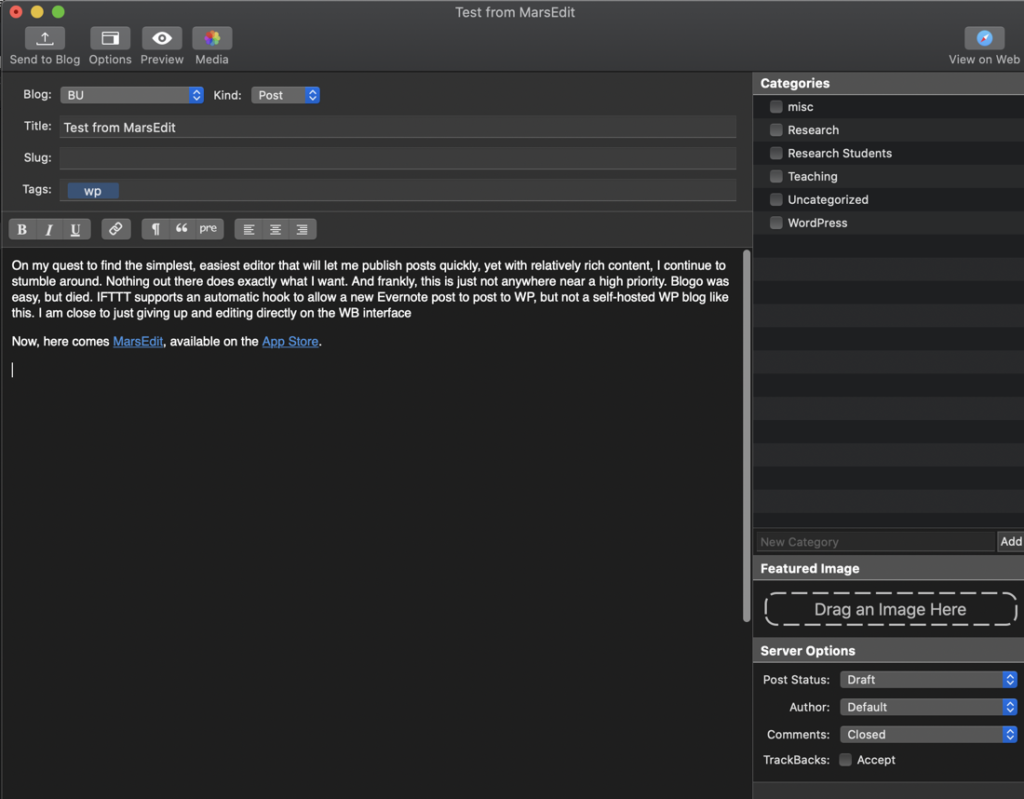
Here’s the interface running on my Mac in Dark Mode. You can see it fully supports Dark Mode in Catalina:

There are also options to edit your slug, tags, select the WP categories this post is assigned to, select your featured image, and other server options to set your post status, author, whether comments are closed, etc. Overall, it seems quite simple. But, I mostly care about editing. You can see above it’s a basic functional rich-text editor. It supports the most common formatting commands.

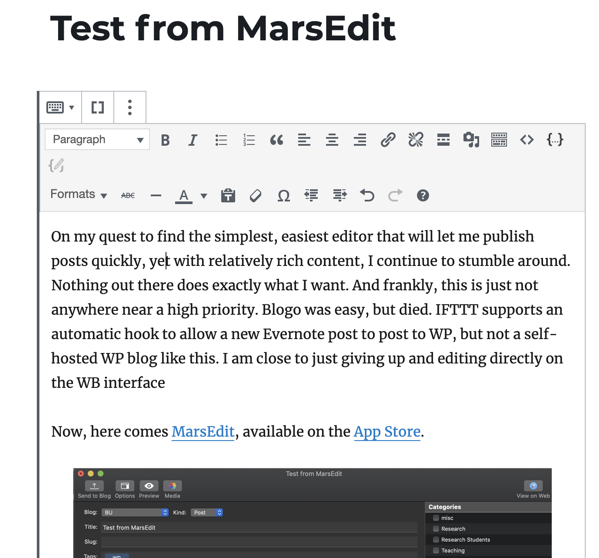
Yet, we know that WP has made a substantial commitment to its Project Gutenberg – their new Blocks editor. So, what happens when you publish a brand new post? It comes up in “classic” mode when you open your post in WP:

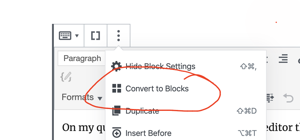
I can attempt to convert my post to Blocks…

MarsEdit_convert_to_blocks

but sometimes it results in no change, and leaves your post in classic mode. Other times, it does indeed work. I’m not certain what the triggers are that prevent your post from converting to separate blocks, though this is not a big deal to me.

At first glance, this tool seems a bit pricey. However, the workflow I need to quickly publish updates from my Mac with minimal effort is definitely there. I might adopt this. Why? There are two tools I rely on extensively when writing documentation – quick screen captures, and recording quick little GIF animations. Having to save a file, upload it to my Media, and then reference it, is an absolute pain.

I’ll try this for a bit…

Past Research Projects

The following are research projects that, for one reason or another, ended up falling down the priority list and are no longer being actively worked on. I list them here as a possible conversation starter with students looking for interesting work

  • [IN PREP] Cowen R, Mitchel MW, Hare-Harris A, King BR. Incorporation of Brown’s stages of syntactic and morphological development in a word prediction model of conversational speech from young children
  • [IN PREP] – Cowen R, Mitchel MW, Hare-Harris A, King BR. An adaptive n-gram based stochastic word prediction model for conversational speech.
  • [IN PREP]- Hare A, Essae E, King BR, Ledbetter DH, Martin CL. Determining the dosage effect of copy number variants in the human genome.
  • [IN PREP] – Ren C, King BR – Protein residue contact map prediction using bagged decision trees

Current Student Research

These are ongoing projects as of Summer 2019


Bhagawat Acharya ’20 – Using deep learning for handwriting text recognition.

  • This is a collaborative, interdisciplinary project with Katherine Faull (Comparative Humanities and German Studies) and Carrie Pirmann (Research Services Librarian). We are working together to develop an improved handwriting translation pipeline to increase the HTR throughput of 17-18th century Moravian handwritten literature that is part of the Moravian archives.
  • Funding – Bucknell Emerging Scholars Summer Research Program

Taehwan Kim ’20 – Using Deep Learning to Forecast Monthly Extreme Temperatures over the United States

  • Undoubtedly, climate change is one of most pressing, disconcerting issues of our time. Collaborating with atmospheric science and aerosol science expert Dabrina Dutcher, Assistant Prof. in Chemistry and Chemical Engineering, we are exploring the use of deep learning to develop advanced models that can improve future temperature predictions
  • Funding – Katherine Mabis McKenna Environmental Internship

Lily Romano ’20 – Software for Aerosol Analysis

  • We are developing a new software toolkit to aid in the aerosol research of my colleagues in Chemical Engineering, Dabrina Dutcher, PhD and Timothy Raymond, PhD. Lily is resuming work that was initiated by former student Khai Nguyen ’18 on the software, including advancing the data analysis tools available for aerosol researchers.
  • Funding – Clare Boothe Luce Research Scholars Program

Kartikeya Sharma ’20 – Trajectory Gaze Path Analysis on Eye Tracking Data for Autism Spectrum Disorder Studies

  • This is a collaborative project with my colleagues, Vanessa Troiani, PhD and Antoinette Sabatino DiCriscio, PhD at the Geisinger Autism Developmental Medicine Institute. The primary aim is to develop a toolkit for the eye tracking research community that incorporates my novel method for extracting scanpath trends from group-level eye tracking data.
  • Funding – Ciffolillo Healthcare Technology Inventors Program

Yili Wang ’21 – Using deep learning to identify discriminative features of images with high interest of autistic children

  • This is a collaborative project with my colleague Vanessa Troiani, PhD at Geisinger Autism and Developmental Medicine Institute. This is also a continuation of a project with former student Tongyu Yang `17, who is continuing to assist with the effort
  • Funding – Bucknell Program for Undergraduate Research (PUR)

These are projects that are unfinished for a variety of reasons:

Including a Jupyter Notebook file on WordPress

I’ve been exploring different mechanisms to post Python Jupyter notebook files on WordPress. Of course, I can use nbconvert to convert my notebook files to other formats – including HTML – right from the command line. I can then post this file as part of an embedded HTML block in a WordPress post. However, this sounded like an unnecessary step, since I also wanted the notebook to be available in GitHub. I did not want to deal with generating this HTML file AND also managing a published notebook on GitLab as well. Smells a lot like duplicate efforts, wasted time. Thanks to a great WordPress plugin from Andy Challis, called nbconvert, I was able to achieve what I wanted! See his page at https://www.andrewchallis.co.uk/portfolio/php-nbconvert-a-wordpress-plugin-for-jupyter-notebooks/ for complete instructions.

  1. If you haven’t yet, you must install WP Pusher as a plugin in your WordPress site. (See this for more info.)
  2. Go to his web page for nbconvert, copy the CSS custom code displayed on the page.
  3. Go to your WordPress page, and add the custom CSS displayed on the page above into Appearance -> Customize -> Additonal CSS
  4. Go to https://github.com/ghandic/nbconvert and verify the latest instructions. Install the nbconvert shortcode plugin through WP Pusher. Activate it.
  5. That’s it!

Follow the instructions to include your own Jupyter notebook file available on GitHub.

Example

Here is an example. In a standalone text (or paragraph) block, I included the following shortcode:

[nbconvert url="https://github.com/bkingcs/python_snippets/blob/master/clustering/hierarchical.ipynb" /]

This generates the following:

Moving to WordPress

So, you’re interested in contributing some code back to the wonderful Internet community. Well, your first stop should surely be Github. If you’ve been a student in Computer Science, or pretty much any discipline where you need some code or libraries to accomplish some task, then surely you know that 1) Github is your primary go-to, and 2) you better have set up an account, and started sharing some examples of code for your future employers and collaborators to see what you do.

For some of us, however, we want access to a platform that can give us a bit more flexibility to be able to be a bit more reflective and educational with the code we share, and not simply just share code. And, of course there are dozens of options out there for doing that as well. For me, I spent years just managing my own site using Adobe Dreamweaver. However, it was becoming a bit overkill for what I was trying to achieve. I’ve used WordPress for various classes I teach, but not for my own endeavors. Well, as of 2019, that has changed. I narrowed down my search between Medium and WordPress, and concluded that both would have worked. However, I ultimately decided on WordPress due to convincing myself that it had a bit more flexibility to do some cool things.

Plugins

At some point, I’ll start a log of plugins I use…

There is one plugin that is one of my favs…

WP Pusher

One plugin I’ll mention right off the bat is WP Pusher. While WordPress manages a pretty rich set of plugins, some developers have complained that it takes a bit of time to get their plugins available through their API. Also, you’ll quickly notice that there are a lot of outdated plugins still available that may not necessarily work properly on your version of WordPress. Instead, you can deploy plugins directly from GitHub, Bitbucket or GitLab.

It’s quite simple to install WP Pusher:

  1. Go to WP Pusher
  2. Download the zip file (wppusher.zip).
  3. Go to your WordPress dashboard, and select Plugins -> Add Plugins -> Upload Plugin. Upload your zip file.
  4. Activate it!

You should now notice that you have a new menu item available called WP Pusher.

That’s it! Find a WordPress plugin on GitHub, and readily install it using WP Pusher! All plugins you install and activate from WP Pusher will then be available and managed from your standard Plugin interface. Very cool.